'%3e%3cmask%20id='mask0_15927_6579'%20style='mask-type:luminance'%20maskUnits='userSpaceOnUse'%20x='0'%20y='0'%20width='20'%20height='20'%3e%3cpath%20d='M0%200H20V20H0V0Z'%20fill='white'/%3e%3c/mask%3e%3cg%20mask='url(%23mask0_15927_6579)'%3e%3cpath%20fill-rule='evenodd'%20clip-rule='evenodd'%20d='M10%200C4.475%200%200%204.475%200%2010C0%2014.425%202.8625%2018.1625%206.8375%2019.4875C7.3375%2019.575%207.525%2019.275%207.525%2019.0125C7.525%2018.775%207.5125%2017.9875%207.5125%2017.15C5%2017.6125%204.35%2016.5375%204.15%2015.975C4.0375%2015.6875%203.55%2014.8%203.125%2014.5625C2.775%2014.375%202.275%2013.9125%203.1125%2013.9C3.9%2013.8875%204.4625%2014.625%204.65%2014.925C5.55%2016.4375%206.9875%2016.0125%207.5625%2015.75C7.65%2015.1%207.9125%2014.6625%208.2%2014.4125C5.975%2014.1625%203.65%2013.3%203.65%209.475C3.65%208.3875%204.0375%207.4875%204.675%206.7875C4.575%206.5375%204.225%205.5125%204.775%204.1375C4.775%204.1375%205.6125%203.875%207.525%205.1625C8.325%204.9375%209.175%204.825%2010.025%204.825C10.875%204.825%2011.725%204.9375%2012.525%205.1625C14.4375%203.8625%2015.275%204.1375%2015.275%204.1375C15.825%205.5125%2015.475%206.5375%2015.375%206.7875C16.0125%207.4875%2016.4%208.375%2016.4%209.475C16.4%2013.3125%2014.0625%2014.1625%2011.8375%2014.4125C12.2%2014.725%2012.5125%2015.325%2012.5125%2016.2625C12.5125%2017.6%2012.5%2018.675%2012.5%2019.0125C12.5%2019.275%2012.6875%2019.5875%2013.1875%2019.4875C15.1726%2018.8173%2016.8976%2017.5414%2018.1197%2015.8395C19.3418%2014.1375%2019.9994%2012.0952%2020%2010C20%204.475%2015.525%200%2010%200Z'%20fill='white'/%3e%3c/g%3e%3c/g%3e%3cdefs%3e%3cclipPath%20id='clip0_15927_6579'%3e%3crect%20width='20'%20height='20'%20fill='white'/%3e%3c/clipPath%3e%3c/defs%3e%3c/svg%3e) GitHub
GitHub'%3e%3cpath%20id='Vector'%20fill-rule='evenodd'%20clip-rule='evenodd'%20d='M0.833333%202.365C0.833774%201.95891%200.995288%201.56958%201.28244%201.28244C1.56958%200.995288%201.95891%200.833774%202.365%200.833333H17.6333C17.8346%200.833005%2018.034%200.872386%2018.2201%200.949222C18.4062%201.02606%2018.5753%201.13884%2018.7177%201.28111C18.8601%201.42339%2018.9731%201.59235%2019.0501%201.77834C19.1272%201.96433%2019.1668%202.16369%2019.1667%202.365V17.6333C19.1667%2018.0399%2019.0052%2018.4297%2018.7179%2018.7173C18.4305%2019.0048%2018.0407%2019.1664%2017.6342%2019.1667H2.365C1.95877%2019.1662%201.56931%2019.0046%201.28214%2018.7173C0.99497%2018.4299%200.833554%2018.0404%200.833333%2017.6342V2.365ZM8.09%207.82333H10.5725V9.07C10.9308%208.35333%2011.8475%207.70833%2013.225%207.70833C15.8658%207.70833%2016.4917%209.13583%2016.4917%2011.755V16.6067H13.8192V12.3517C13.8192%2010.86%2013.4608%2010.0183%2012.5508%2010.0183C11.2883%2010.0183%2010.7633%2010.9258%2010.7633%2012.3517V16.6067H8.09V7.82333ZM3.50667%2016.4925H6.18V7.70833H3.50667V16.4925ZM6.5625%204.84333C6.56754%205.07223%206.52681%205.29982%206.4427%205.51276C6.35859%205.7257%206.23279%205.9197%206.07269%206.08336C5.91259%206.24702%205.72142%206.37706%205.51038%206.46584C5.29934%206.55462%205.0727%206.60035%204.84375%206.60035C4.6148%206.60035%204.38816%206.55462%204.17712%206.46584C3.96608%206.37706%203.77491%206.24702%203.61481%206.08336C3.45471%205.9197%203.32891%205.7257%203.2448%205.51276C3.16069%205.29982%203.11996%205.07223%203.125%204.84333C3.13489%204.39405%203.32032%203.96649%203.64157%203.65224C3.96282%203.33798%204.39435%203.16201%204.84375%203.16201C5.29315%203.16201%205.72468%203.33798%206.04593%203.65224C6.36718%203.96649%206.55261%204.39405%206.5625%204.84333Z'%20fill='white'/%3e%3c/g%3e%3cdefs%3e%3cclipPath%20id='clip0_0_641'%3e%3crect%20width='20'%20height='20'%20fill='white'/%3e%3c/clipPath%3e%3c/defs%3e%3c/svg%3e) LinkedIn
LinkedInProduct
MedusaWatch is a web app that helps you choose, before leaving home, which of Mallorca's beaches have the lowest estimated chance of jellyfish.
Paula RodasSenior Product Designer & Product Builder· open to new projects
Work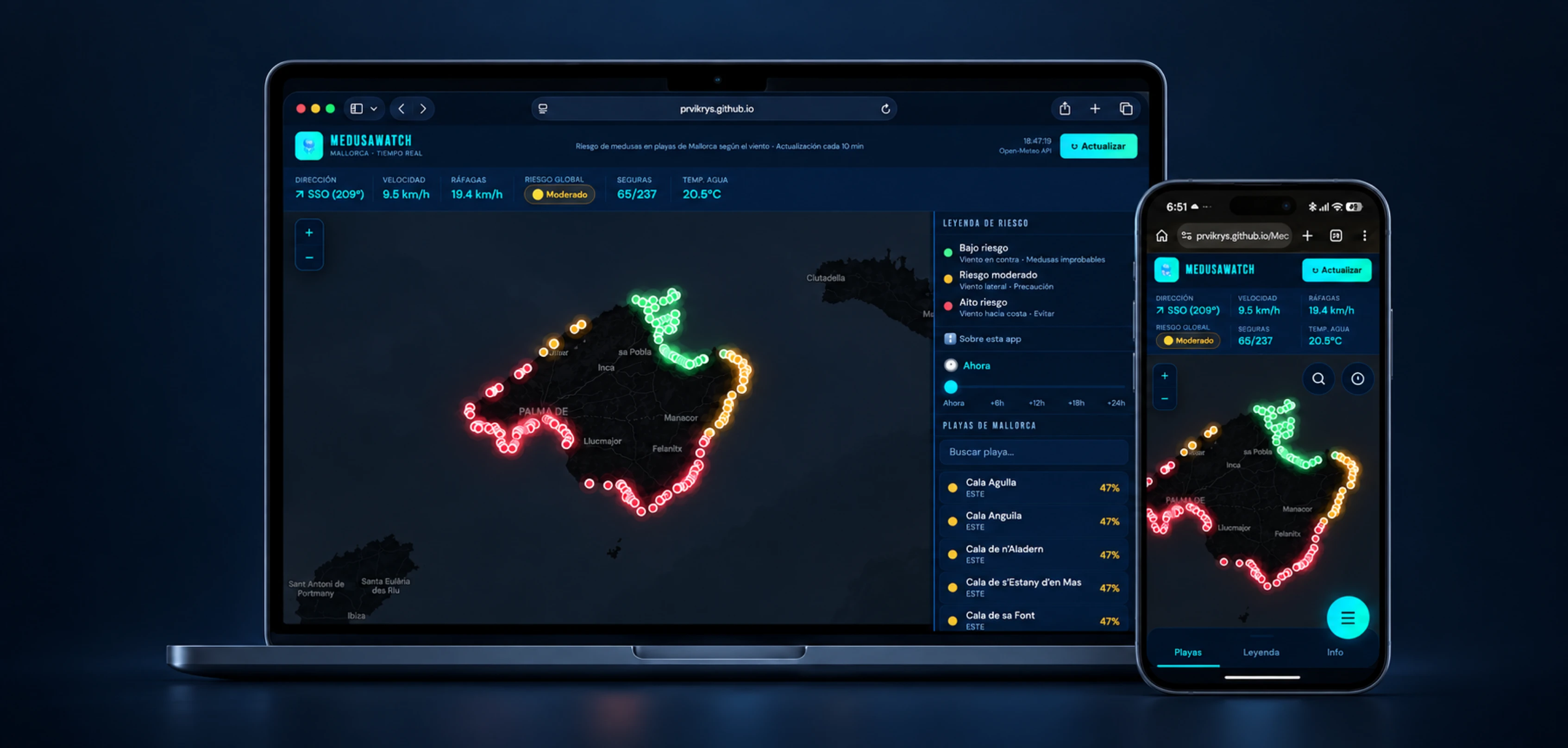
What can I build in two days if I start from a well-defined PRD and use AI to speed up the work? Design and development of a web prototype that turns wind data into an estimated jellyfish risk for Mallorca's beaches.
11 min read
MedusaWatch is a web app that helps you choose, before leaving home, which of Mallorca's beaches have the lowest estimated chance of jellyfish.
The exercise started from a specific question: how far could I get by combining a well-defined PRD, my front-end knowledge, and AI's ability to execute?
My role covered product definition, UX/UI, directing the work with AI, frontend, QA, and launch. AI proposed options and sped up production; I decided what to build, how it should behave, and when the result was good enough to move on.
227 beaches in Mallorca, each with its own wind-based estimate.
OVERVIEW
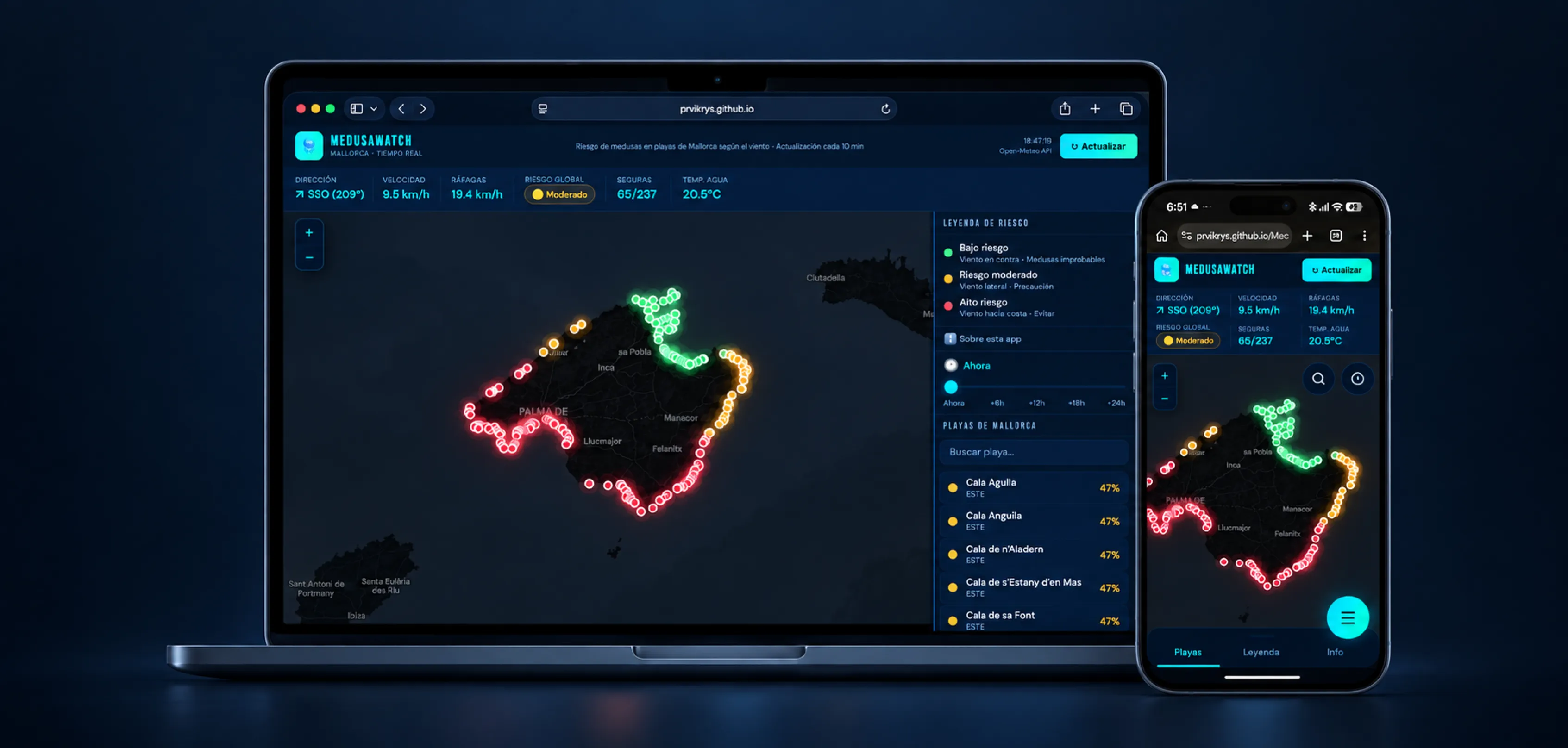
MedusaWatch is a web app that helps you choose, before leaving home, which of Mallorca’s beaches have the lowest estimated chance of jellyfish. It combines each beach’s orientation with wind data and shows the risk level on a map.
I built the first working prototype in two days, starting from a specific need and a defined PRD. The days after that went into fixing bugs and refining the UX and UI, especially on mobile. My role covered product definition, UX/UI, directing the work with AI, frontend, QA, and launch. AI proposed options and sped up production; I decided what to build, how it should behave, and when the result was good enough to move on.
ORIGIN
The project came from connecting a real need with local knowledge. A friend planning a trip to Mallorca told me she was worried about running into jellyfish and didn’t know how to see it coming. At the same time, I remembered something a friend from Menorca had told me: locals watched the wind direction to decide which coast to go to and lower their chances of finding jellyfish.
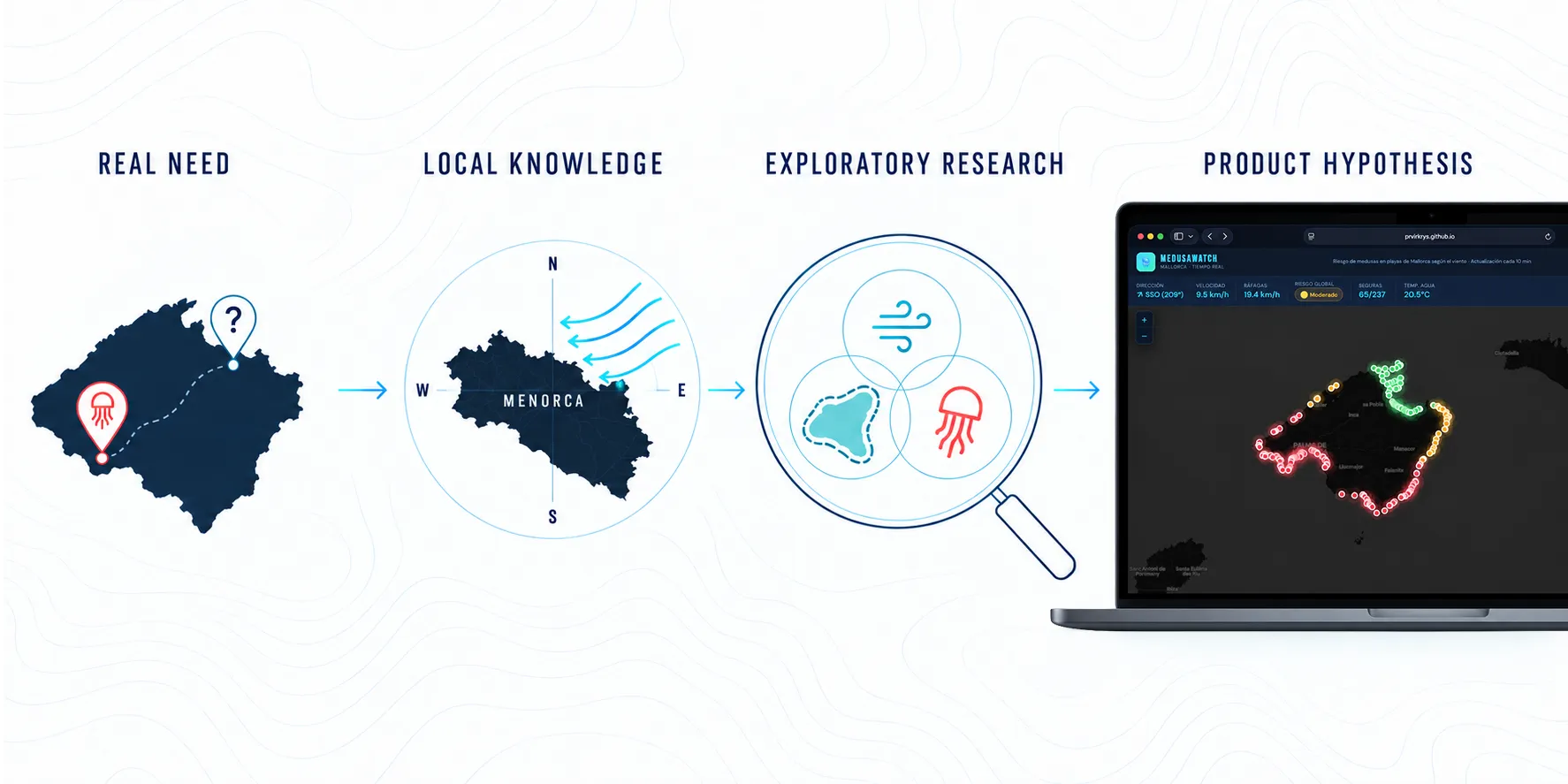
That local knowledge became a product hypothesis. Before building, I ran some checks and did early AI-assisted research to understand the link between wind, coastline orientation, and possible jellyfish build-up, and to judge whether it could carry over from Menorca to Mallorca. The exploratory research couldn’t promise there would be no jellyfish, but it gave enough grounds to form a product hypothesis, define the problem, and turn it into a PRD.
THE CHALLENGE
The exercise started from a specific question: how far could I get by combining a well-defined PRD, my front-end knowledge, and AI’s ability to execute? The point wasn’t whether AI could generate an isolated interface. It was to test whether this way of working could take me from a defined need to a first working prototype in very little time. My job was to steer the process, understand what was built, and stay in control of the decisions.
The PRD reduced ambiguity before any code was written. It defined the problem, the main use, and a small scope:
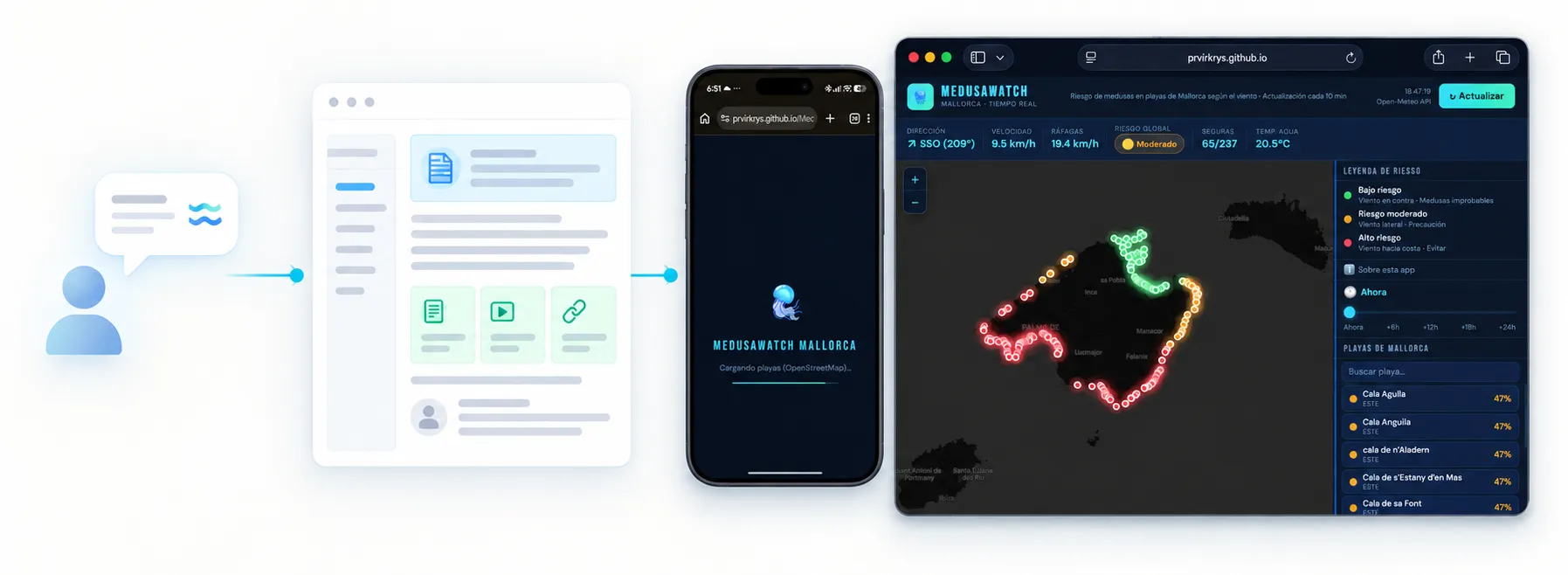
During those same two days, I tested the idea further through traveler forums, app reviews, and competitor analysis. The research gave early support to the hypothesis and revealed an important tension: solutions based on sightings are reactive and depend on someone reporting first. MedusaWatch’s opportunity was to help people decide ahead of time.
Defined real need + clear PRD + product judgment + frontend + AI → a working prototype in two days?
AI-ASSISTED PROTOTYPING
AI significantly cut the time it took to reach a first tangible version: it generated implementation proposals, explored alternatives, and turned decisions into code at a speed I wouldn’t have reached working alone from scratch.
But faster execution didn’t remove the need to know what was happening. My front-end knowledge is what let me read the overall logic, judge whether each proposal was feasible, and steer the next iteration.
I didn’t need to write every line by hand to stay responsible for the result. I did need to understand the pieces, set good constraints, notice when a solution didn’t answer the problem, and check it in the browser.
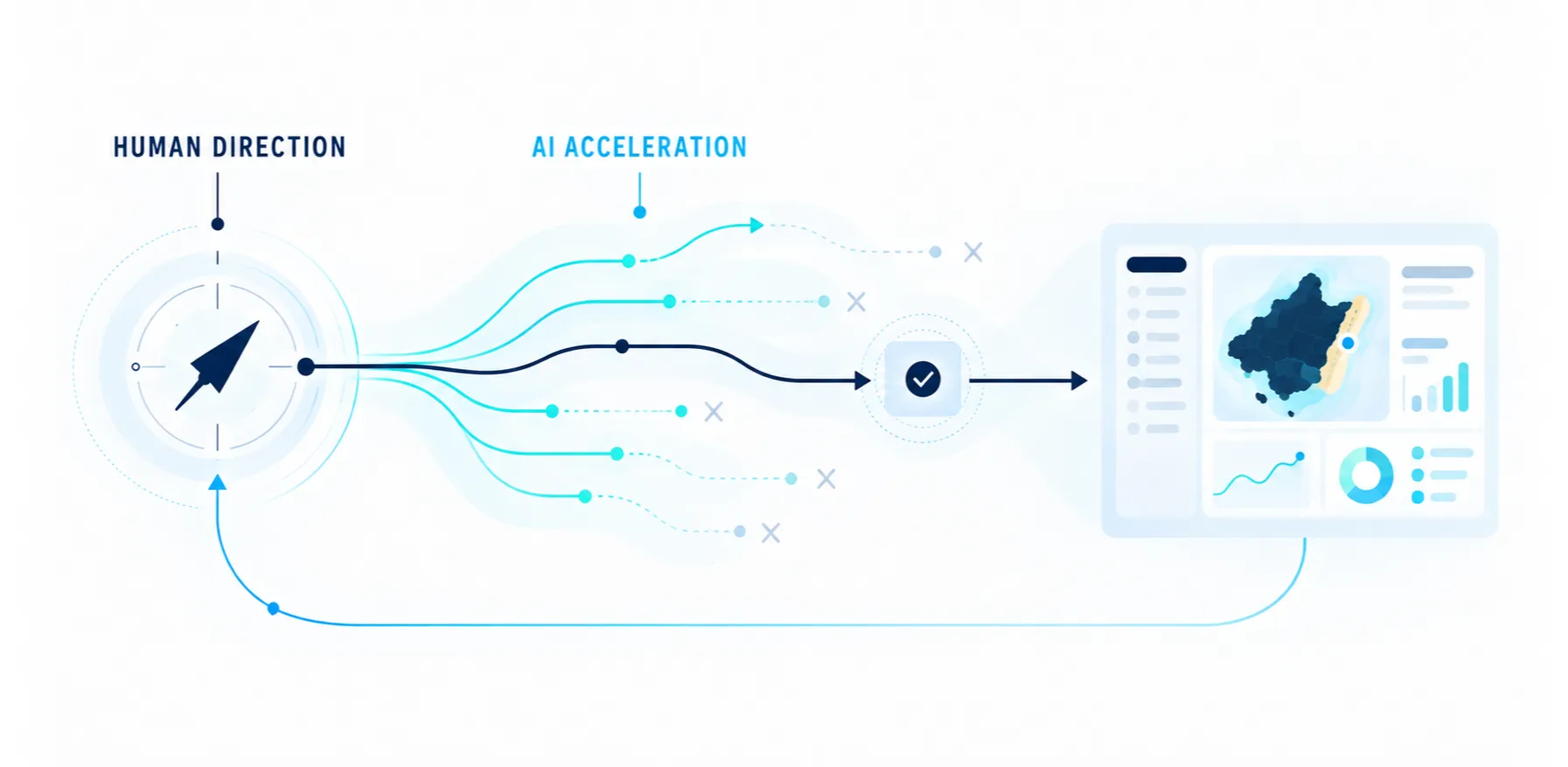
Define → ask for a proposal → understand → evaluate → redirect → test → learn
WIND-TO-RISK MODEL
Showing wind direction and speed would have left the interpretation to the user. The product needed to turn that data into a useful answer: which beaches have a lower or higher estimated risk right now.
The model compares the wind direction with each beach’s orientation and adds wind speed as an extra factor. The result comes in three levels (low, moderate, and high) so the map can be scanned at a glance.
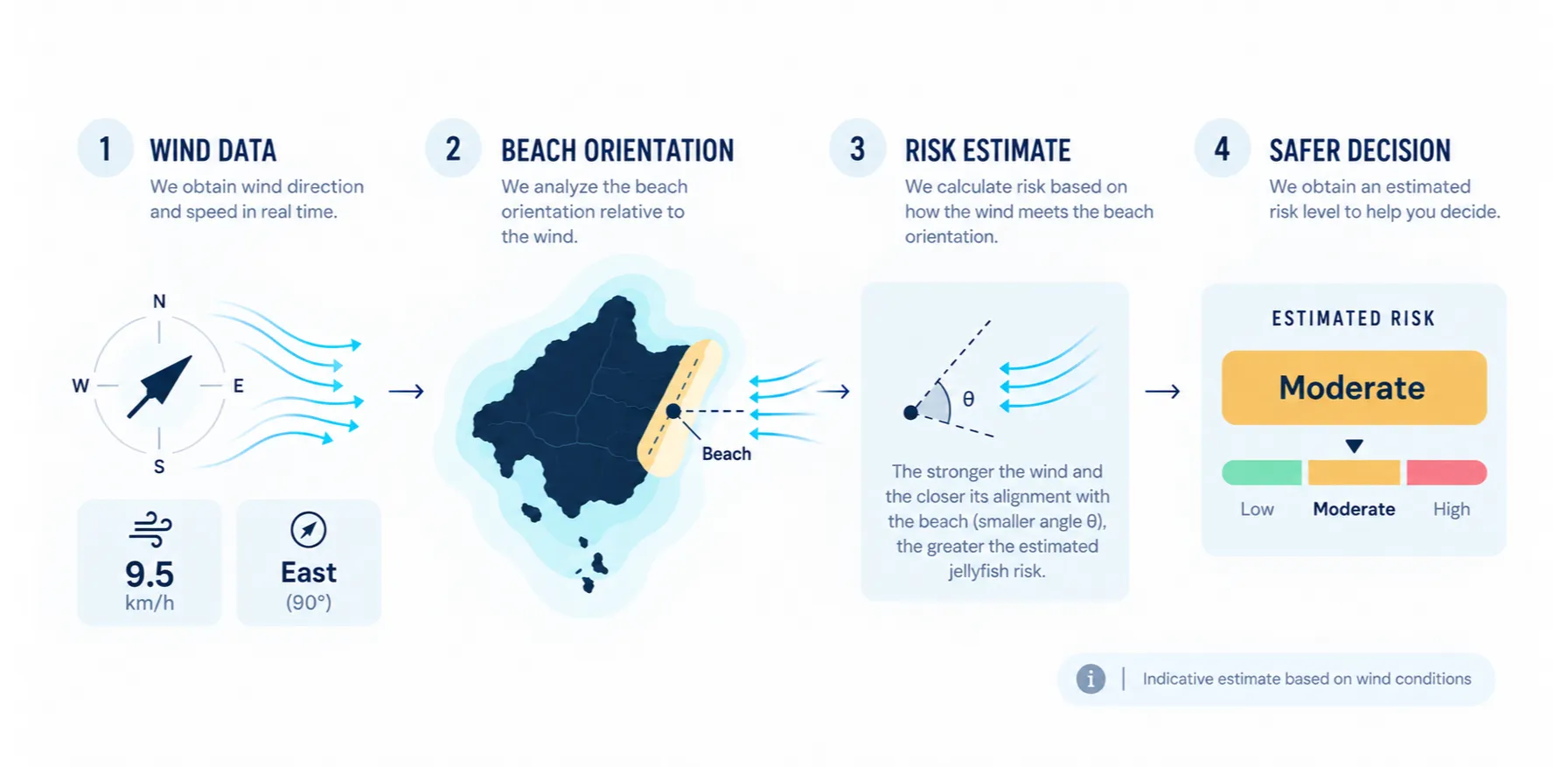
The key decision wasn’t to build a weather map. It was to use the data as raw material for an action: wind direction → relation to the beach’s orientation → estimated level → comparing options. This took the product from a regional reading to a specific signal for each of the 227 indexed beaches.
DESIGNING UNCERTAINTY
MedusaWatch doesn’t detect jellyfish or confirm sightings: it estimates a risk level from the wind. Turning that calculation into clear colors made the product more useful, but it could also suggest more certainty than the evidence supports.
To keep that difference visible:
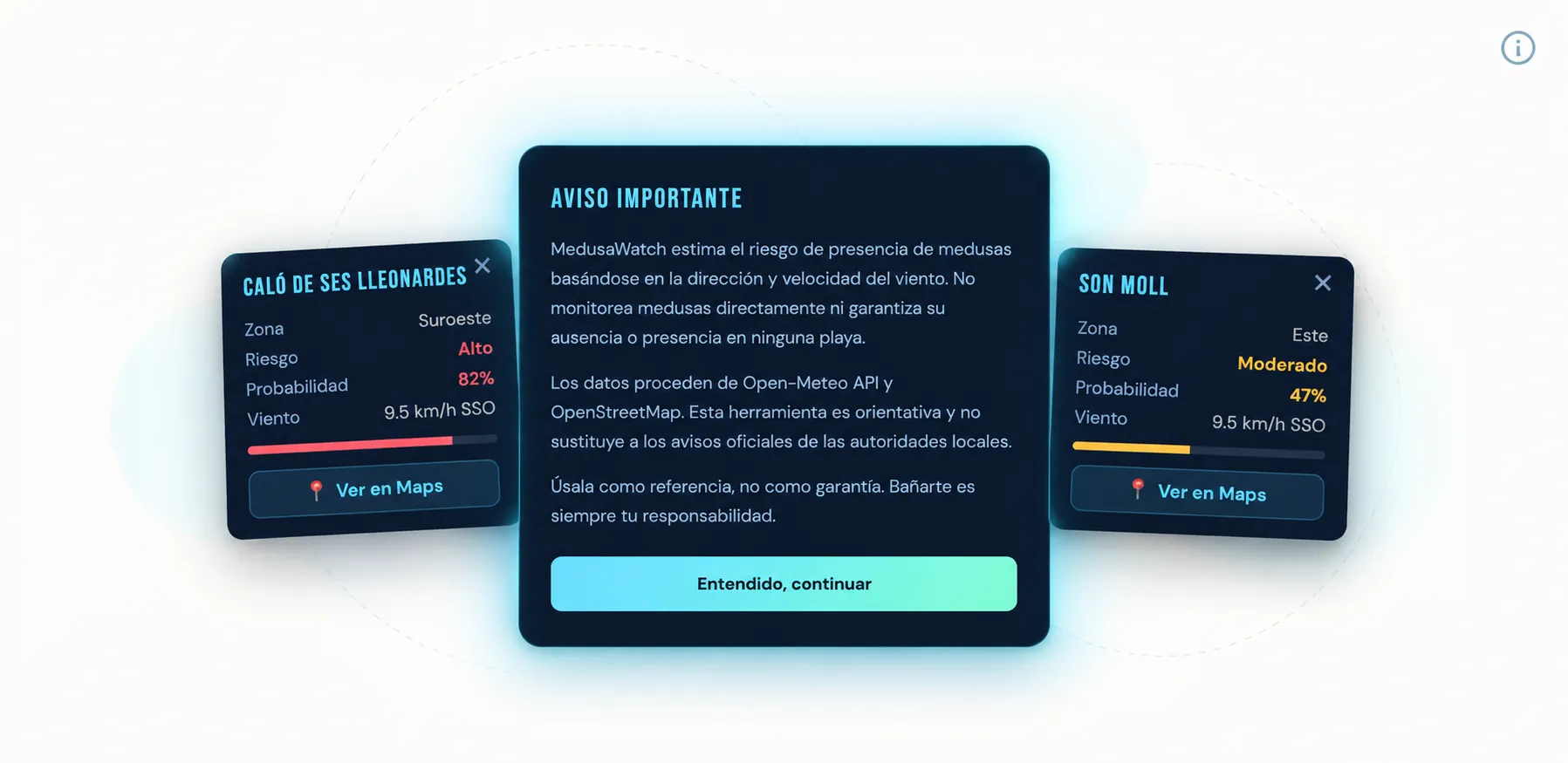
The disclaimer wasn’t a legal add-on placed at the end. It was part of the experience: it had to inform without blocking every visit or competing with the main action.
ARCHITECTURE
The goal was to learn and launch, not to build more infrastructure than needed. I chose Vanilla JavaScript, HTML, and CSS, with no framework or build step. That kept the product logic visible while I was learning, reduced dependencies and setup, let me publish a static app on GitHub Pages, and let me work with external APIs without adding a premature backend.
The app was split into modules with separate responsibilities: orchestration, beach data, map, interface, and utilities. That structure made it easier to understand AI’s proposals, review changes, and fix one part without losing sight of the whole.
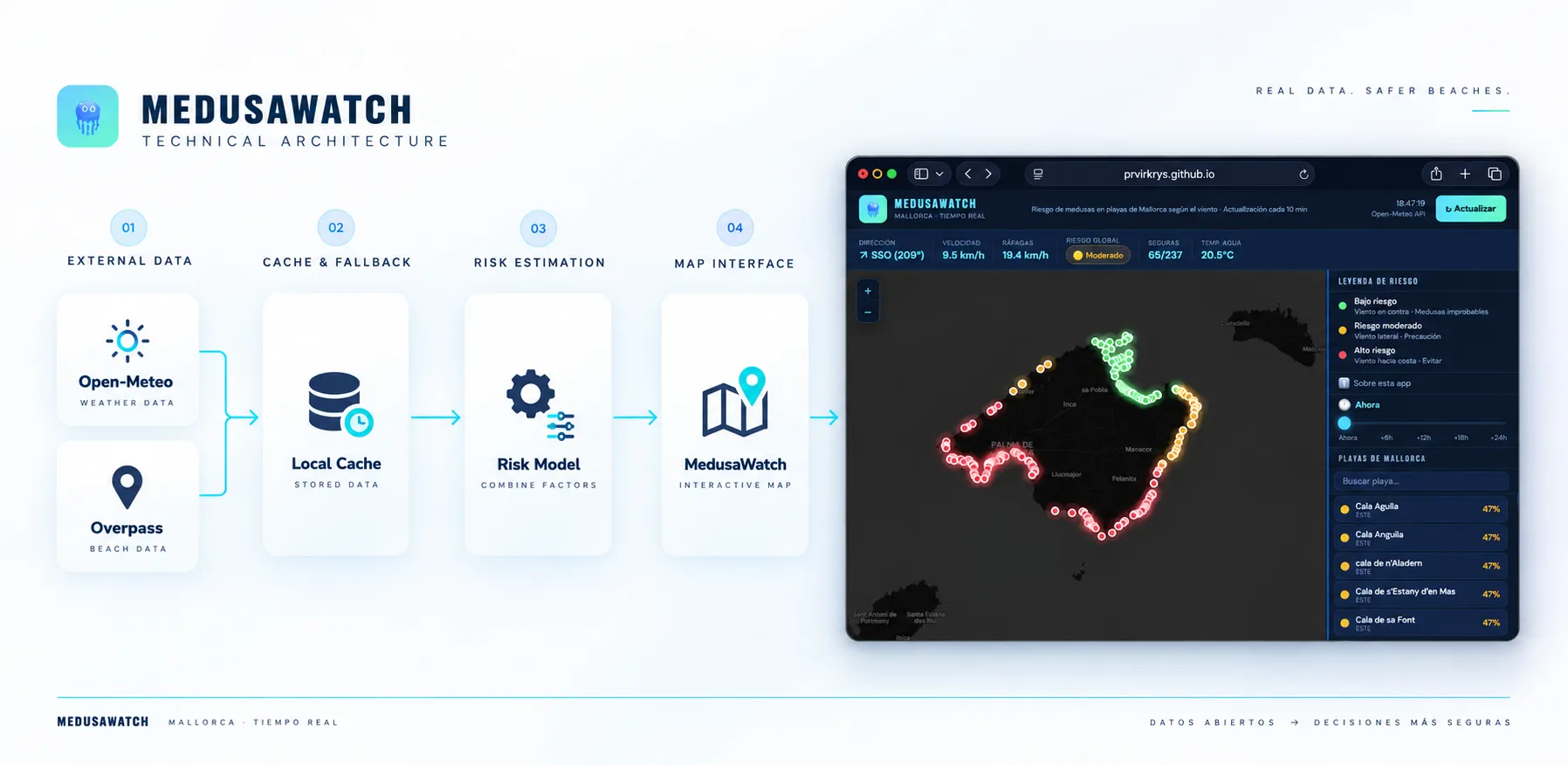
Simplicity didn’t remove external failures. The Overpass API can respond slowly, or not at all. To keep a service problem from leaving the screen empty, I added a 24-hour beach cache in localStorage and a fallback to earlier data when needed.
Less infrastructure → more understanding → faster iterations → a publishable product
RESPONSIVE DESIGN
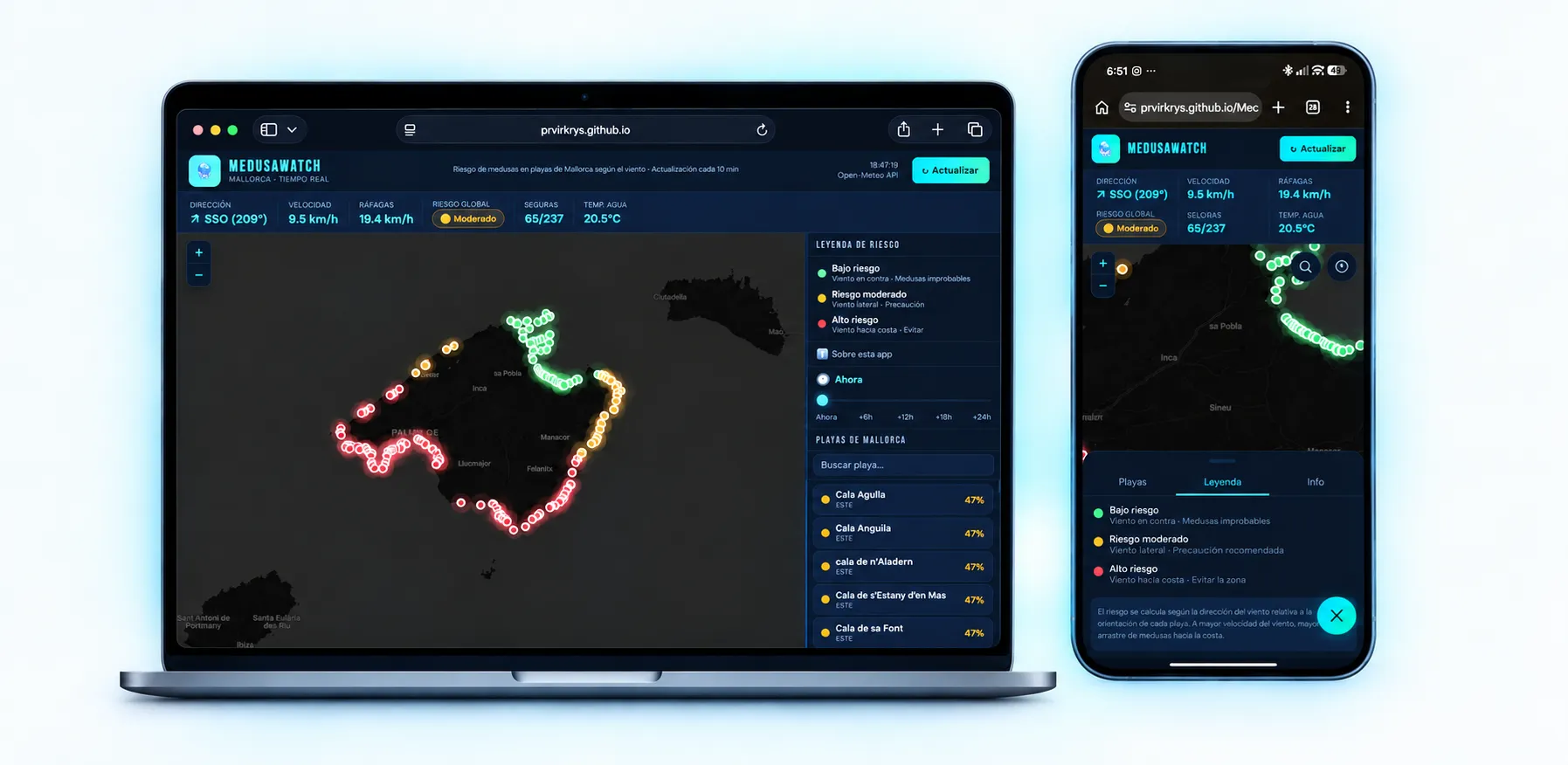
The map, search, beach list, legend, and time control had to work together on very different screens. The most likely context was mobile: checking the app before heading out or while planning the day. So I gave the mobile experience special priority and worked with two layouts:
The features stay the same, but their hierarchy changes. On desktop, the panel supports exploration; on mobile, it appears when the person needs it and gives the map back the focus when closed.
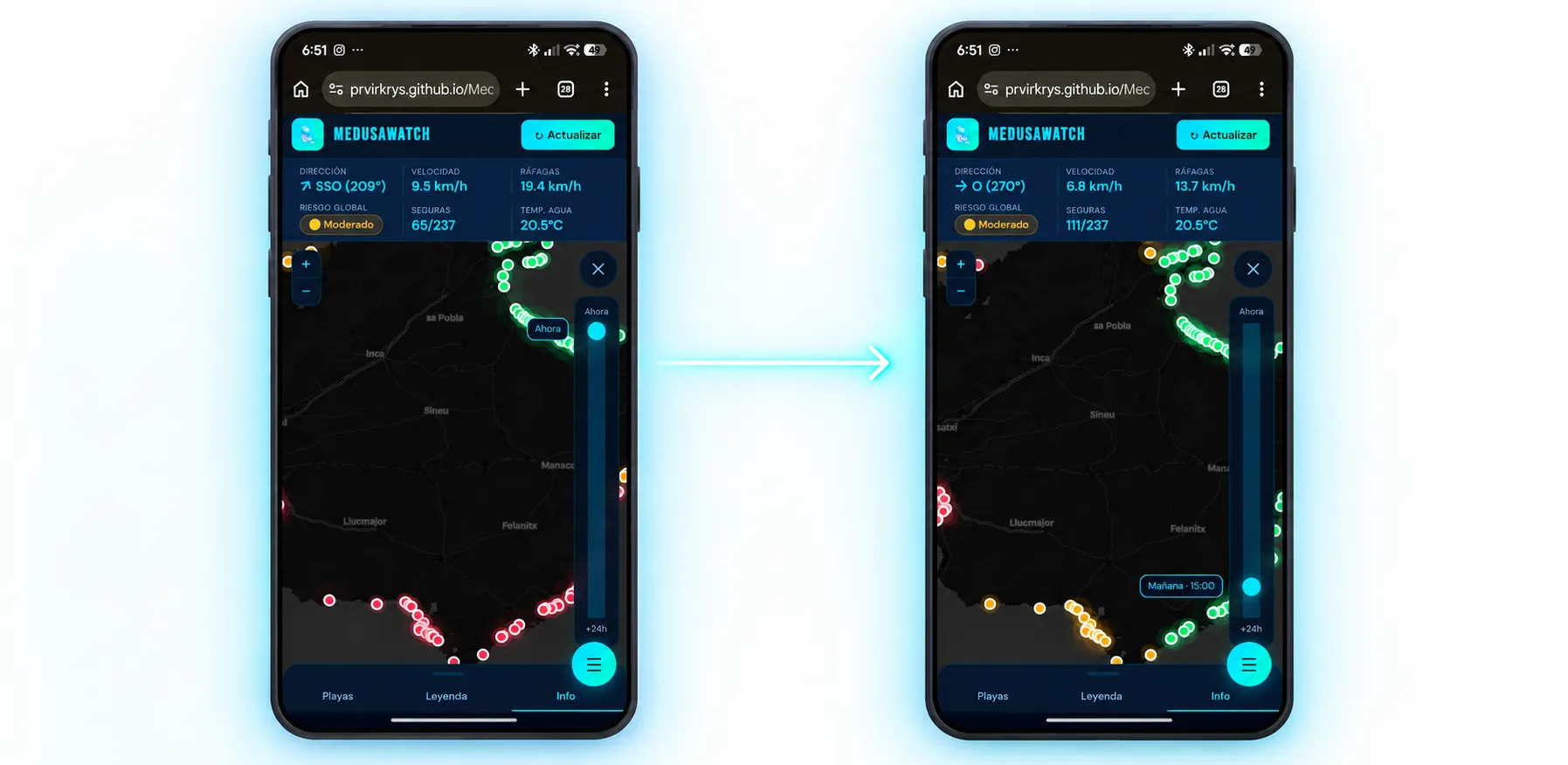
To complete the journey, I added a Directions button that opens each beach’s location in Google Maps. The time control shows how the risk may change over the next 24 hours, so people can plan their beach ahead of time. This feature came in a later iteration, once it became clear that the decision isn’t always made in the moment.
QA & PUBLISHING
The first version proved the idea could work. Turning it into something publishable took a different kind of work: reviewing states, testing behaviors, finding bugs, and deciding what had to be fixed before launch.
During the pre-launch review, I:
Added a visible error state for when an API failed.
Fixed a calculation that showed the water temperature for the first hour instead of the current hour.
Added a clear description of the product and when it updates.
Connected the legend that explains the risk levels.
Built in the first-visit disclaimer and permanent access to it.
Reviewed the public documentation and legal notices.
Real need → early research + PRD → prototype in two days → iteration → QA → launch on GitHub Pages
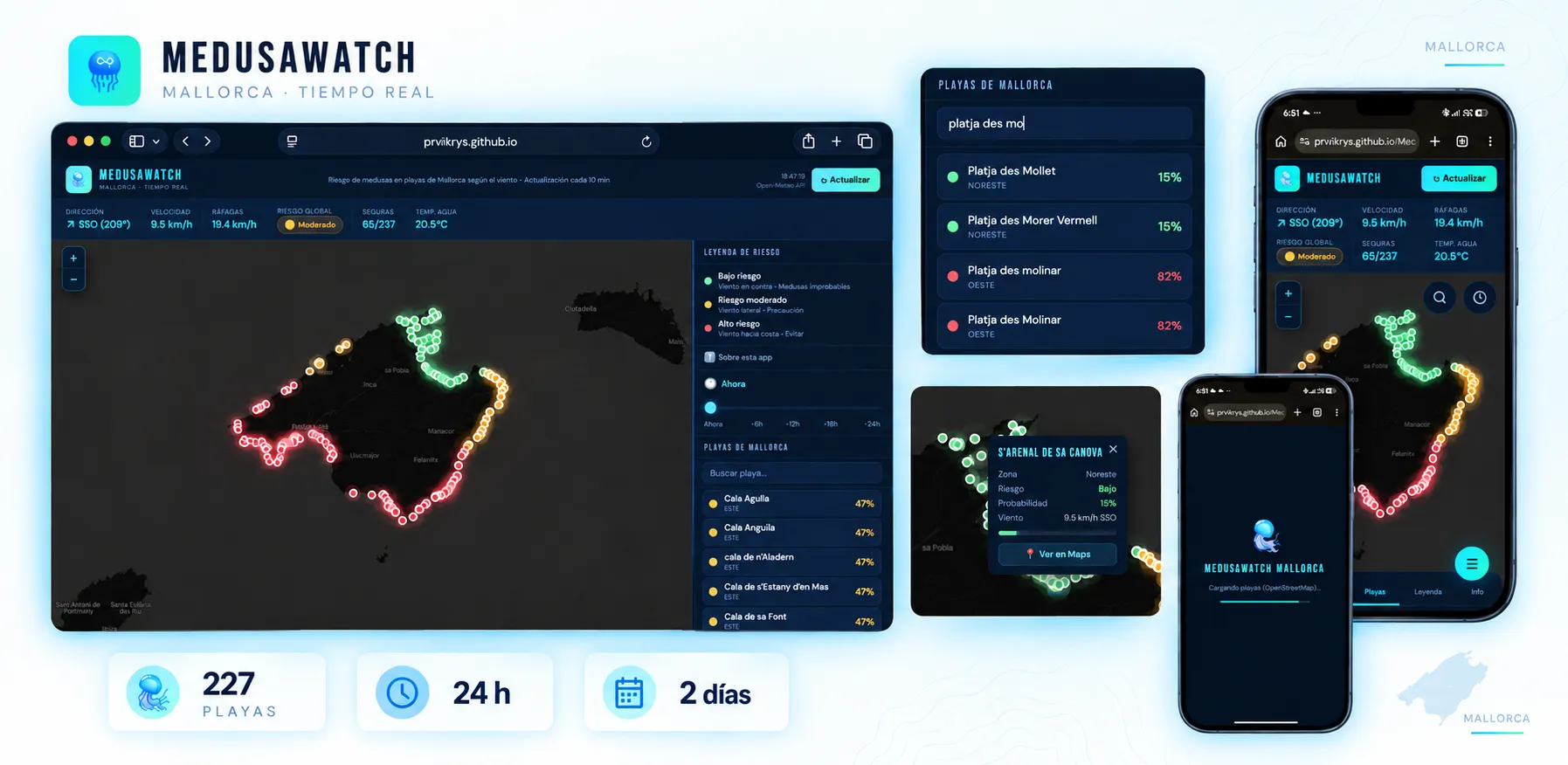
RESULT
MedusaWatch went live on GitHub Pages on May 25, 2026. I didn’t run a launch or distribution campaign, so this result shows building and publishing, not adoption yet.
The exercise proved the idea was technically feasible and turned a two-day prototype into a publishable product, while I kept a clear understanding of the main decisions. It isn’t a shift toward “doing everything”: it’s a natural extension of how I work, understanding what an idea needs to move forward and learning what I need to shape it. Here, AI expanded what I could build, and frontend let me steer it.
I don’t have adoption or user impact results to share yet. The app is live, but formal validation with real people is still pending.
Explore MedusaWatch (opens in a new tab) · Review the code (opens in a new tab)
NEXT STEPS
The product starts from a reasoned hypothesis and exploratory research, but a working prototype is not the same as a validated problem. The next tests with real users will need to check:
Other product improvements still on the list: map accessibility, a contrast review of some indicators, multilingual support, an installable version, and expansion to other islands.
LEARNINGS
The PRD set the limits of the problem, the main action, and what had to stay out. AI sped up execution because it had clear direction.
My knowledge let me read the logic, ask better questions, spot oversized proposals, and approve only what I could understand and verify.
API failures, loading states, caching, the right timestamp for the data, and mobile behavior became visible when working with a real product.
MedusaWatch confirms the idea can be built and published. The pending tests will need to show whether it helps people decide, and what has to change to make it truly useful.
Next case study
Base · From a product grid to a brand experience