'%3e%3cmask%20id='mask0_15927_6579'%20style='mask-type:luminance'%20maskUnits='userSpaceOnUse'%20x='0'%20y='0'%20width='20'%20height='20'%3e%3cpath%20d='M0%200H20V20H0V0Z'%20fill='white'/%3e%3c/mask%3e%3cg%20mask='url(%23mask0_15927_6579)'%3e%3cpath%20fill-rule='evenodd'%20clip-rule='evenodd'%20d='M10%200C4.475%200%200%204.475%200%2010C0%2014.425%202.8625%2018.1625%206.8375%2019.4875C7.3375%2019.575%207.525%2019.275%207.525%2019.0125C7.525%2018.775%207.5125%2017.9875%207.5125%2017.15C5%2017.6125%204.35%2016.5375%204.15%2015.975C4.0375%2015.6875%203.55%2014.8%203.125%2014.5625C2.775%2014.375%202.275%2013.9125%203.1125%2013.9C3.9%2013.8875%204.4625%2014.625%204.65%2014.925C5.55%2016.4375%206.9875%2016.0125%207.5625%2015.75C7.65%2015.1%207.9125%2014.6625%208.2%2014.4125C5.975%2014.1625%203.65%2013.3%203.65%209.475C3.65%208.3875%204.0375%207.4875%204.675%206.7875C4.575%206.5375%204.225%205.5125%204.775%204.1375C4.775%204.1375%205.6125%203.875%207.525%205.1625C8.325%204.9375%209.175%204.825%2010.025%204.825C10.875%204.825%2011.725%204.9375%2012.525%205.1625C14.4375%203.8625%2015.275%204.1375%2015.275%204.1375C15.825%205.5125%2015.475%206.5375%2015.375%206.7875C16.0125%207.4875%2016.4%208.375%2016.4%209.475C16.4%2013.3125%2014.0625%2014.1625%2011.8375%2014.4125C12.2%2014.725%2012.5125%2015.325%2012.5125%2016.2625C12.5125%2017.6%2012.5%2018.675%2012.5%2019.0125C12.5%2019.275%2012.6875%2019.5875%2013.1875%2019.4875C15.1726%2018.8173%2016.8976%2017.5414%2018.1197%2015.8395C19.3418%2014.1375%2019.9994%2012.0952%2020%2010C20%204.475%2015.525%200%2010%200Z'%20fill='white'/%3e%3c/g%3e%3c/g%3e%3cdefs%3e%3cclipPath%20id='clip0_15927_6579'%3e%3crect%20width='20'%20height='20'%20fill='white'/%3e%3c/clipPath%3e%3c/defs%3e%3c/svg%3e) GitHub
GitHub'%3e%3cpath%20id='Vector'%20fill-rule='evenodd'%20clip-rule='evenodd'%20d='M0.833333%202.365C0.833774%201.95891%200.995288%201.56958%201.28244%201.28244C1.56958%200.995288%201.95891%200.833774%202.365%200.833333H17.6333C17.8346%200.833005%2018.034%200.872386%2018.2201%200.949222C18.4062%201.02606%2018.5753%201.13884%2018.7177%201.28111C18.8601%201.42339%2018.9731%201.59235%2019.0501%201.77834C19.1272%201.96433%2019.1668%202.16369%2019.1667%202.365V17.6333C19.1667%2018.0399%2019.0052%2018.4297%2018.7179%2018.7173C18.4305%2019.0048%2018.0407%2019.1664%2017.6342%2019.1667H2.365C1.95877%2019.1662%201.56931%2019.0046%201.28214%2018.7173C0.99497%2018.4299%200.833554%2018.0404%200.833333%2017.6342V2.365ZM8.09%207.82333H10.5725V9.07C10.9308%208.35333%2011.8475%207.70833%2013.225%207.70833C15.8658%207.70833%2016.4917%209.13583%2016.4917%2011.755V16.6067H13.8192V12.3517C13.8192%2010.86%2013.4608%2010.0183%2012.5508%2010.0183C11.2883%2010.0183%2010.7633%2010.9258%2010.7633%2012.3517V16.6067H8.09V7.82333ZM3.50667%2016.4925H6.18V7.70833H3.50667V16.4925ZM6.5625%204.84333C6.56754%205.07223%206.52681%205.29982%206.4427%205.51276C6.35859%205.7257%206.23279%205.9197%206.07269%206.08336C5.91259%206.24702%205.72142%206.37706%205.51038%206.46584C5.29934%206.55462%205.0727%206.60035%204.84375%206.60035C4.6148%206.60035%204.38816%206.55462%204.17712%206.46584C3.96608%206.37706%203.77491%206.24702%203.61481%206.08336C3.45471%205.9197%203.32891%205.7257%203.2448%205.51276C3.16069%205.29982%203.11996%205.07223%203.125%204.84333C3.13489%204.39405%203.32032%203.96649%203.64157%203.65224C3.96282%203.33798%204.39435%203.16201%204.84375%203.16201C5.29315%203.16201%205.72468%203.33798%206.04593%203.65224C6.36718%203.96649%206.55261%204.39405%206.5625%204.84333Z'%20fill='white'/%3e%3c/g%3e%3cdefs%3e%3cclipPath%20id='clip0_0_641'%3e%3crect%20width='20'%20height='20'%20fill='white'/%3e%3c/clipPath%3e%3c/defs%3e%3c/svg%3e) LinkedIn
LinkedInStarting point
I started by receiving designs and building them in HTML, CSS, and Sass.
Paula RodasSenior Product Designer & Product Builder· open to new projects
Work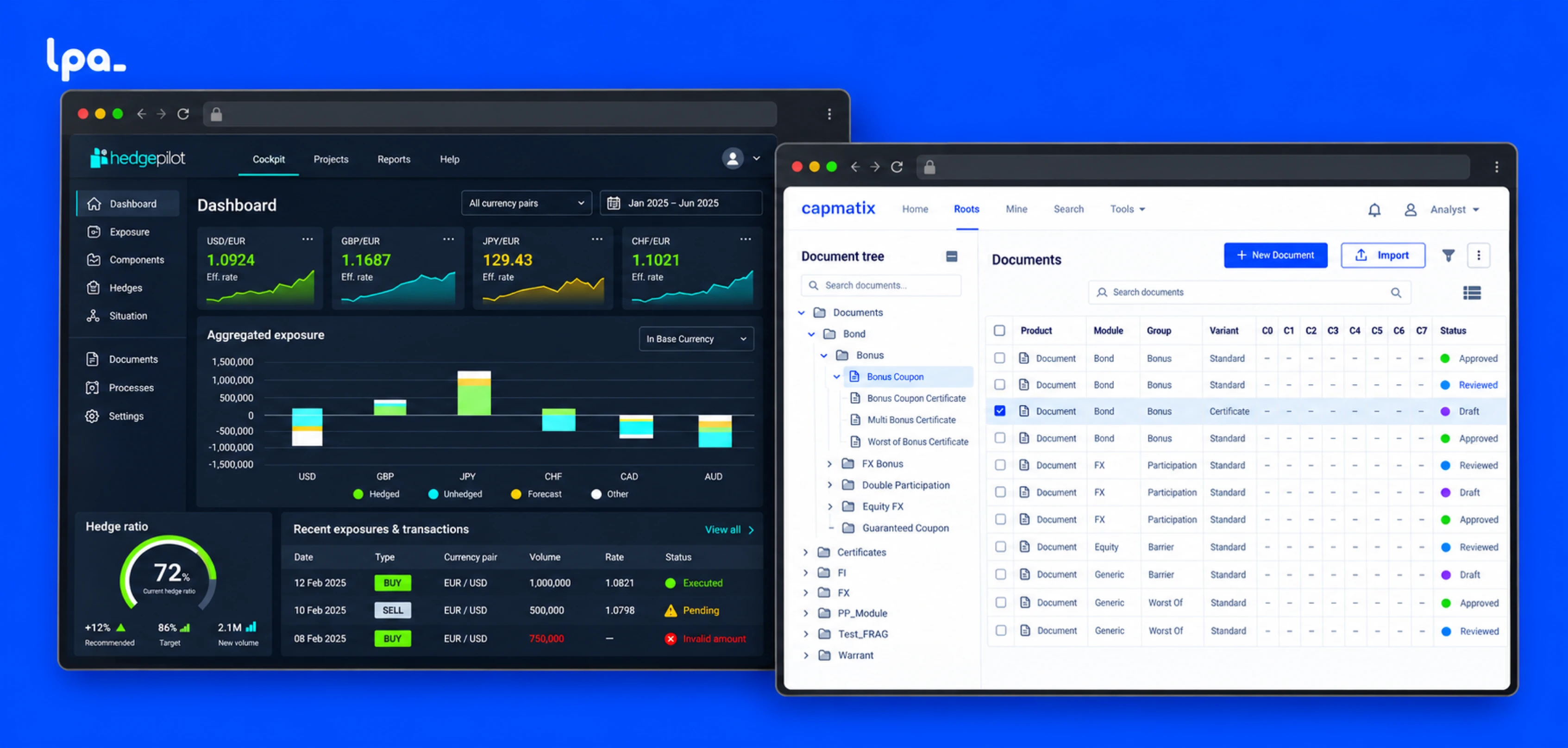
How do you go from coding interfaces designed by others to owning the design, implementation, and handoff of complete B2B financial products? A story of growing as a Product Designer through HedgePilot and WebDD/Capmatix.
9 min read
I started by receiving designs and building them in HTML, CSS, and Sass.
Over time, I took on complete user stories, from definition and design to front-end build and handoff, plus user research, design systems, and implementation support.
I built a professional practice that sits between product, design, and frontend.

OVERVIEW
I joined the Barcelona office of Lucht Probst Associates (LPA) while I was doing the second postgraduate program of my master’s at Elisava. The team needed a product designer who could also code interfaces: design was mostly based in Germany, and development needed close support in Barcelona.
I started by receiving designs and building them in HTML, CSS, and Sass. In the first few months, I also started working on design, first on HedgePilot and then on WebDD, now known as Capmatix. Over time, I took on complete user stories, from definition and design to front-end build and handoff, plus user research, design systems, and implementation support.
HYBRID PROFILE
My way in was visual implementation. I received designs created by the team in Germany and built them in HTML, CSS, and Sass inside the product’s environment. The goal wasn’t yet to define the experience, but to make sure the proposals could become real interfaces.
This work let me learn from the start:
Working closely with development built a foundation that would later shape all my design decisions.
Receive designs → understand constraints → build interfaces that can be implemented
GROWING AUTONOMY
HedgePilot was the first product where my responsibilities started to grow. It was a new application for managing financial hedging strategies. The team in Germany had defined a visual direction, guidelines, and a design system; my work started by continuing that language.
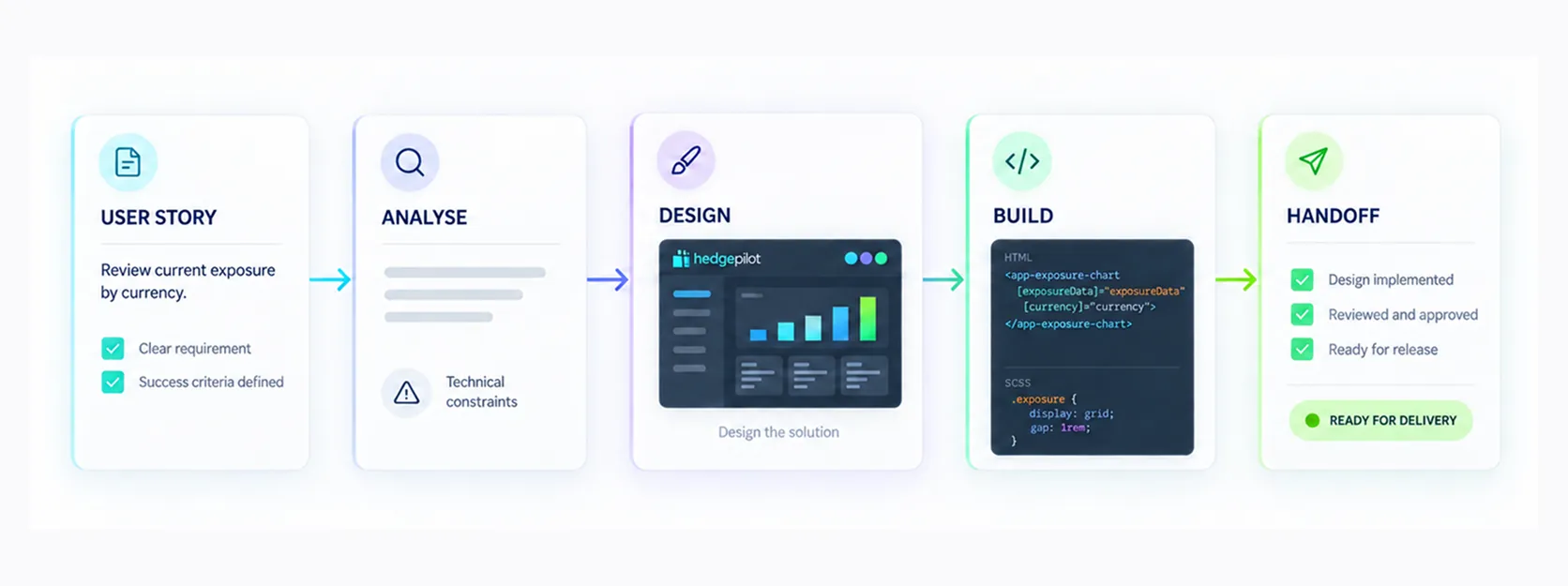
After about a month, I started getting design assignments. Over time, I worked both on proposals coming from Germany and on new requirements. I became responsible for complete user stories: analyzing the need, designing the solution, discussing it with the team, building its visual layer with HTML and Sass, and handing it off so the product logic could be completed.
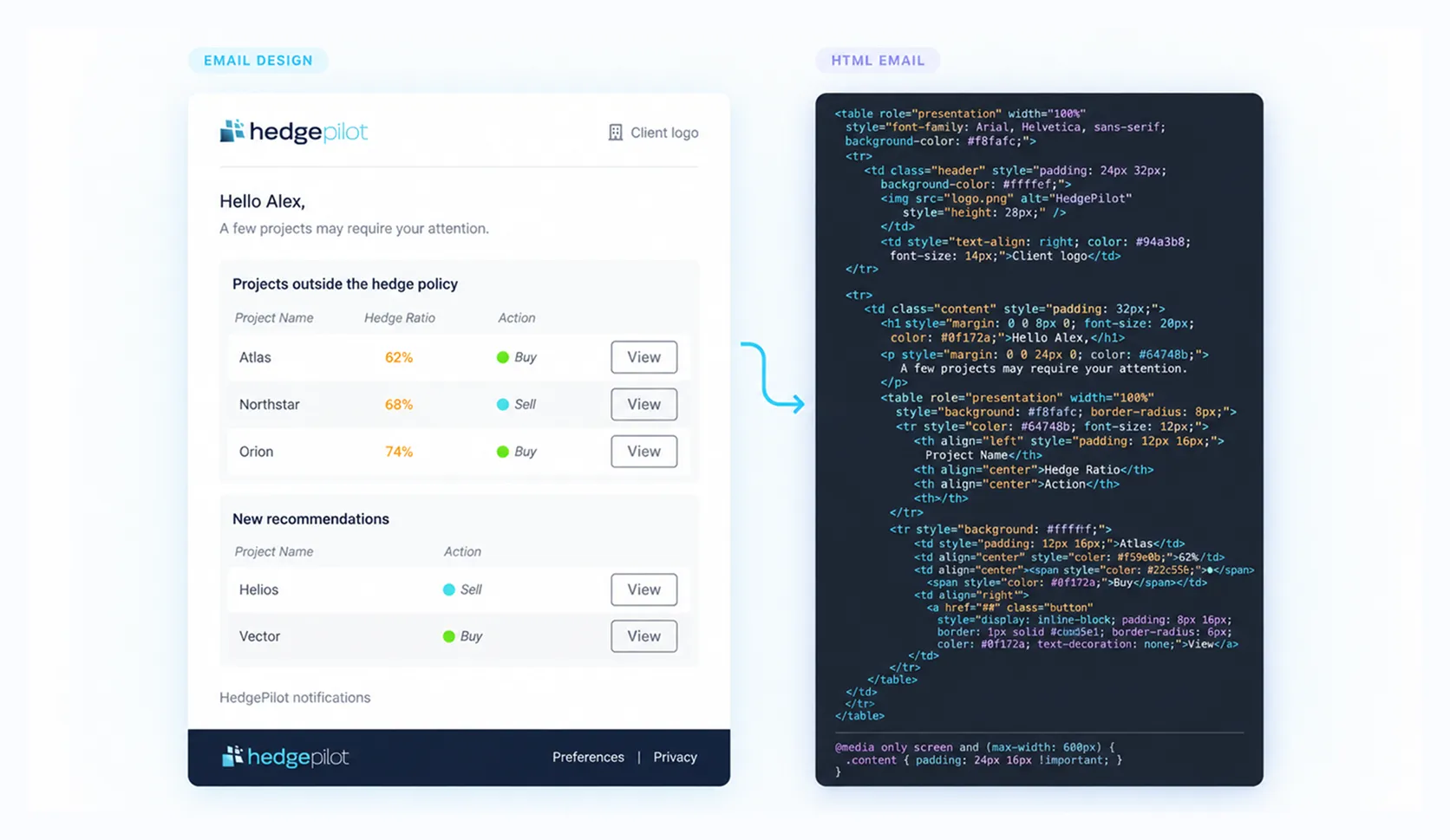
My technical knowledge also let me handle pieces beyond the main screens. I designed and coded HTML notification emails so that alerts and recommendations kept HedgePilot’s language outside the app.
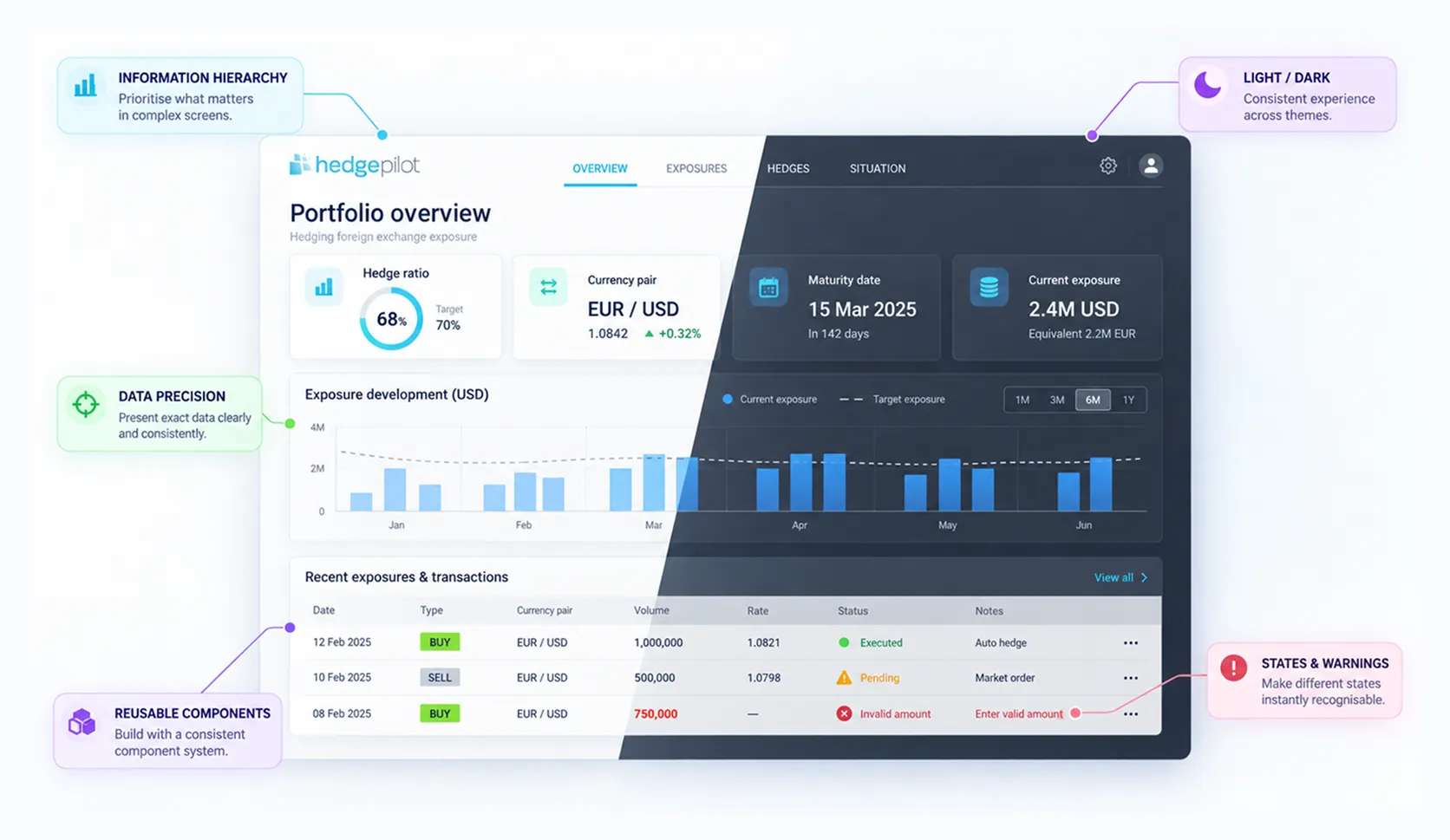
The product brought together dashboards, ratios, currencies, dates, exposures, transactions, states, and validations. Designing these screens meant learning to:
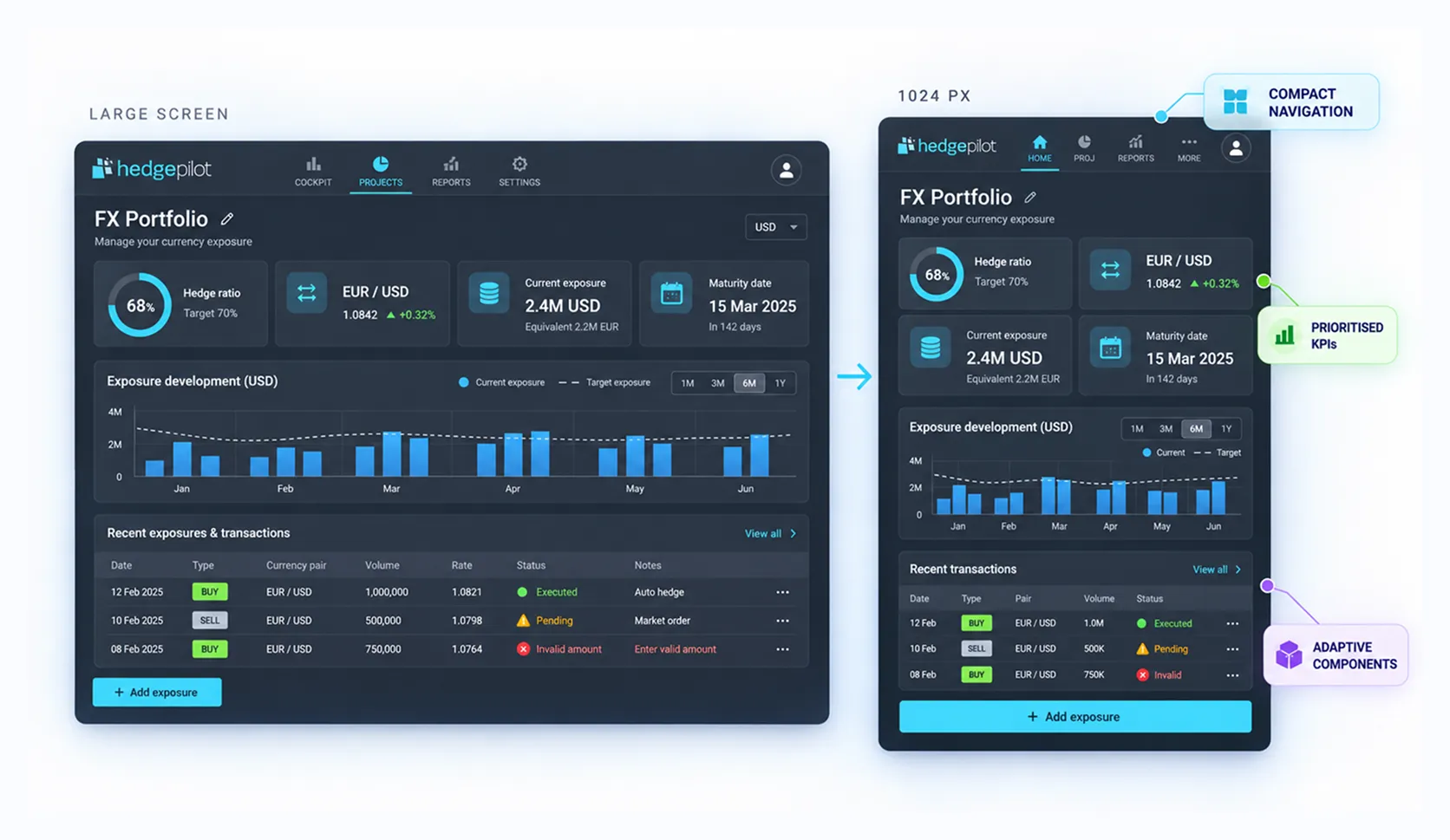
HedgePilot was originally designed for larger resolutions. When it needed to work on 1024 px screens, I had to rethink the hierarchy, density, and behavior of its components to build a smaller, more adaptable version without losing critical information.
Implement an existing system → interpret requirements → own design, front-end build, and handoff
DESIGN SYSTEMS
WebDD posed a different problem. The software already existed as a desktop application, had users, and packed in many interactions typical of a specialized financial tool. Bringing it to the web meant keeping its power without carrying over all of its complexity as it was.
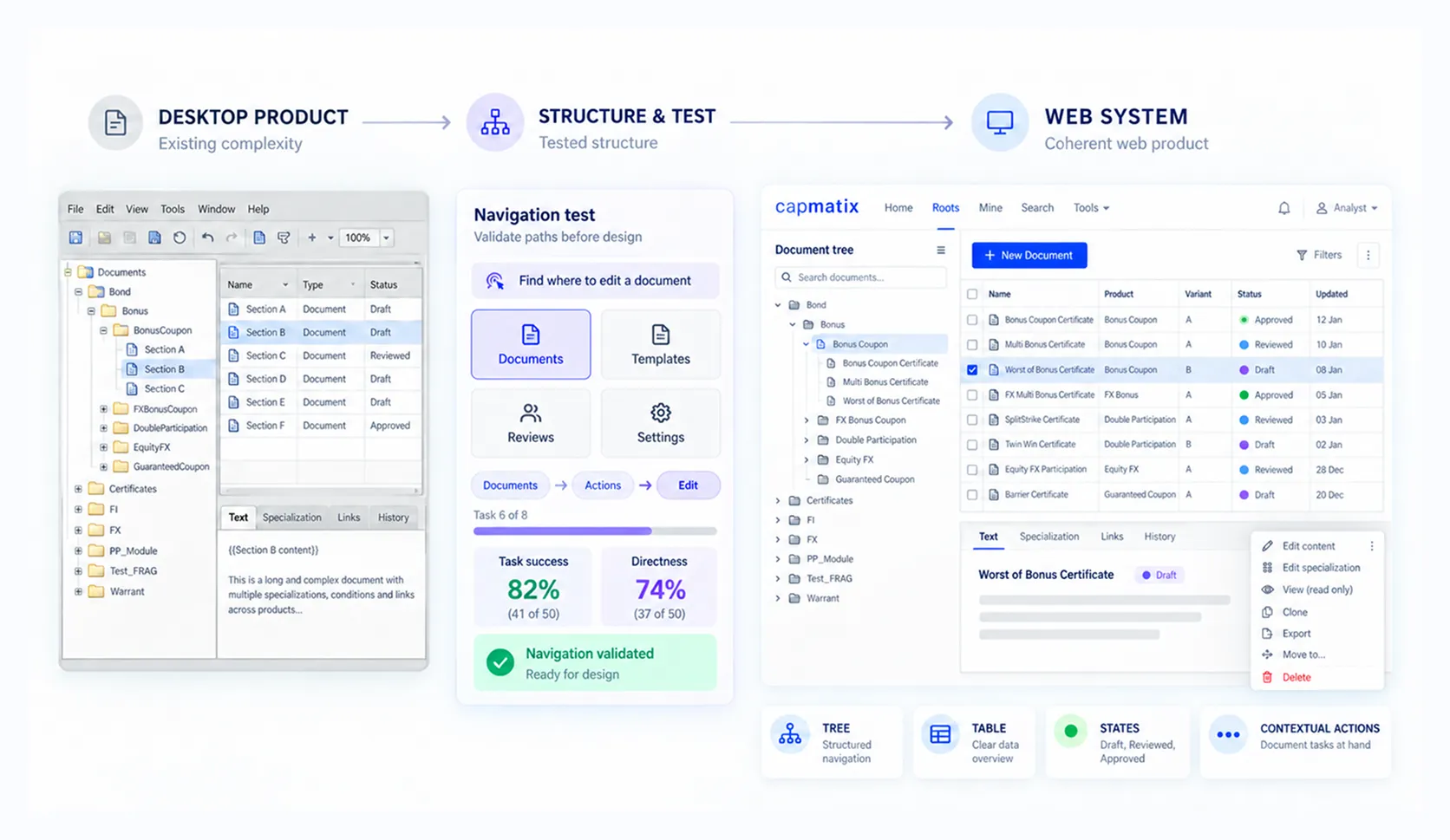
My responsibilities included:
Users knew the desktop application and expected to find similar behaviors and logic in the new version. However, the web had different limitations and also offered opportunities to improve the experience significantly.
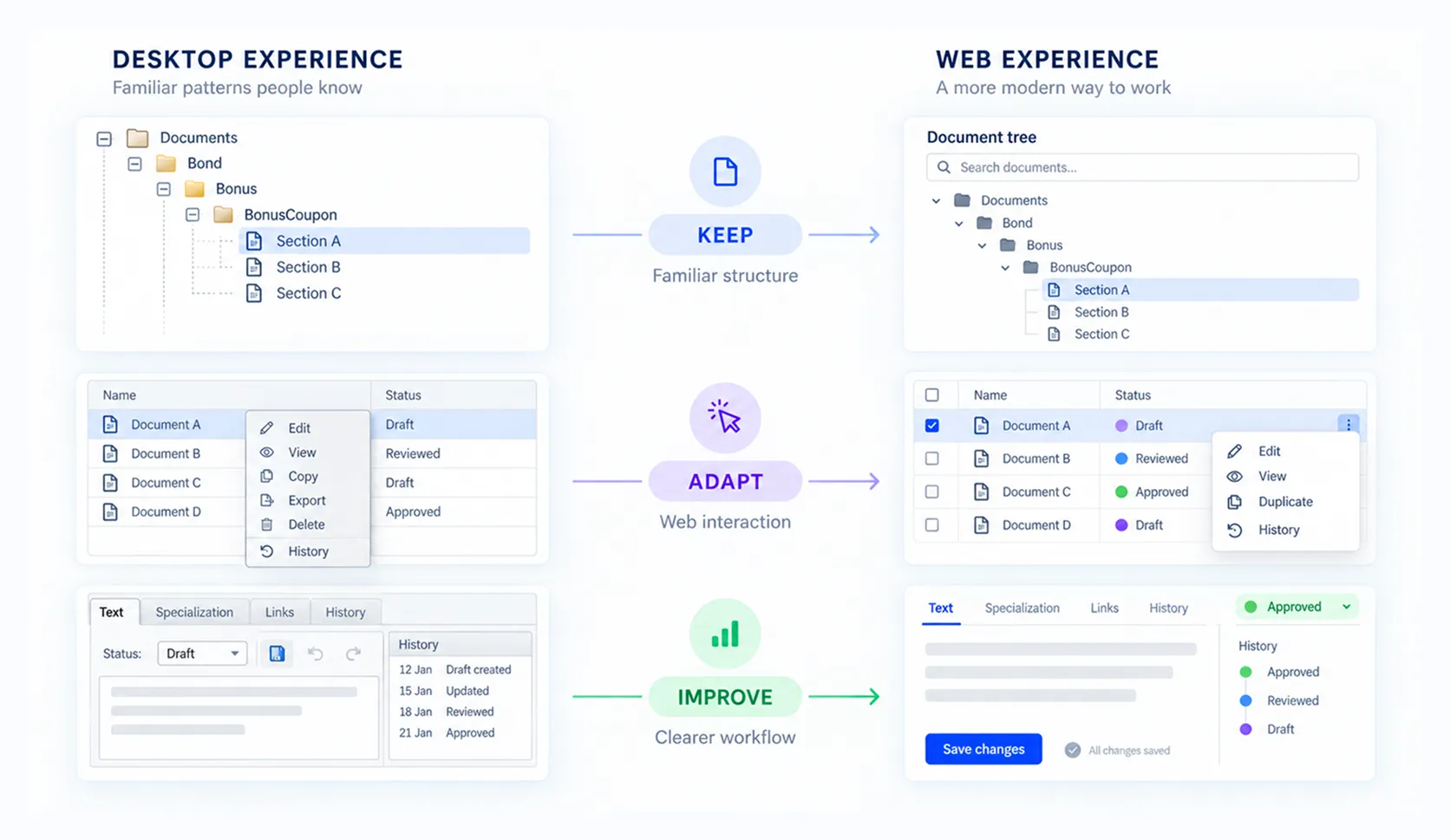
The challenge was to identify which mental models and capabilities had to stay, which interactions couldn’t be carried over as they were, and where the new platform let us simplify the work. The solution had to feel familiar to experienced users while showing that the web version could help them work more clearly and efficiently.
At one point in development, the application needed to adopt AG Grid as the technical base for trees and tables. The design had to adapt to the framework’s rules and possibilities. To do that, I reviewed its documentation, learned how it worked, and translated the existing patterns into an experience consistent with the product.
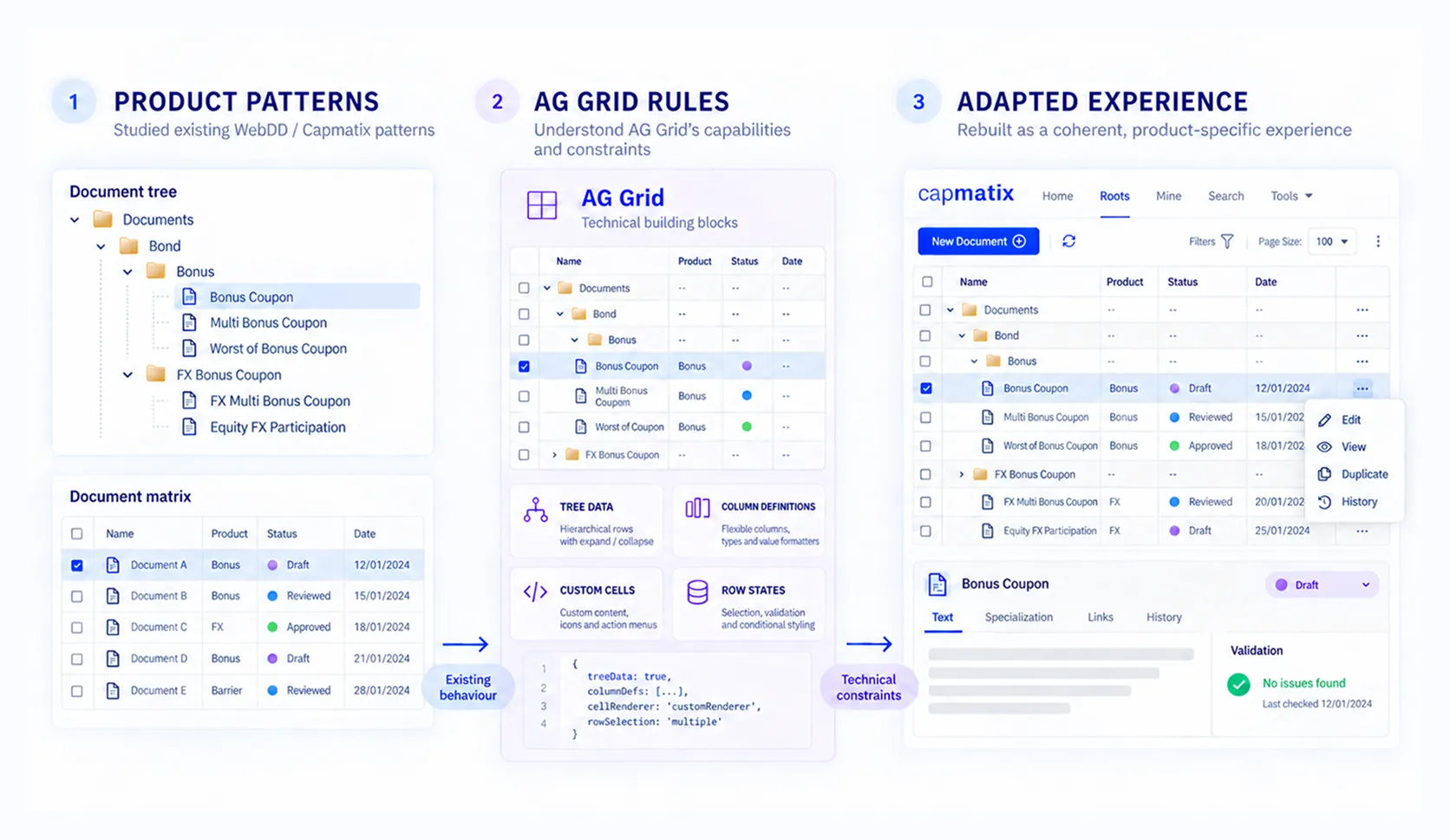
Design screens → research structures → build a system → adapt the design to a technical architecture
DESIGN + CODE
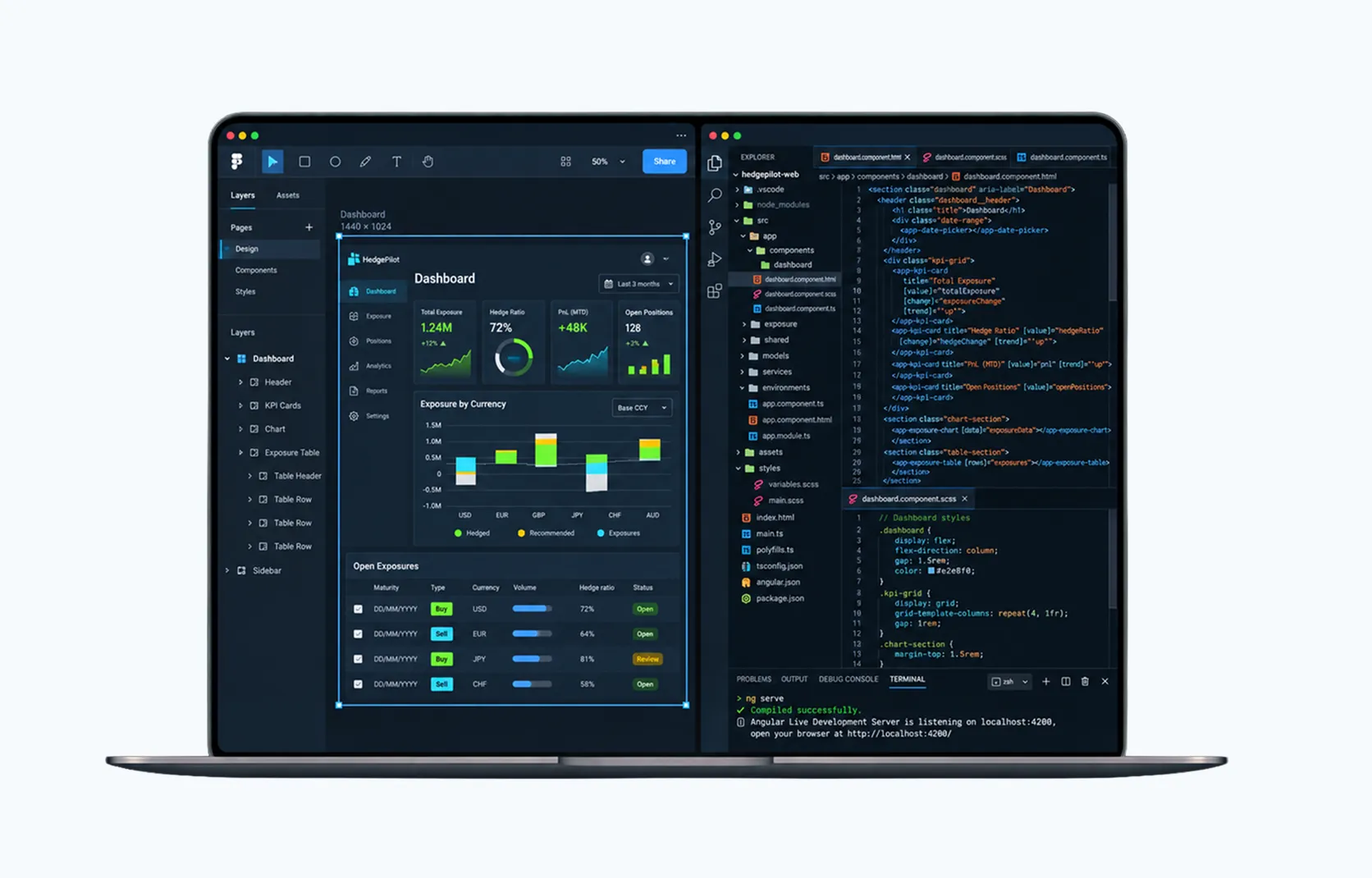
As I gained autonomy, code stopped being just the step after design and became a tool to explore and decide. I took part in meetings, sprints, and technical conversations; created prototypes in Figma when needed; prepared HTML and Sass; and stayed available during implementation to answer questions and adjust behaviors.
On some tasks, I designed directly in HTML and CSS. When a feature didn’t need exploring in Figma first, I used the browser and code as my design space, shortening the distance between proposal and implementation.
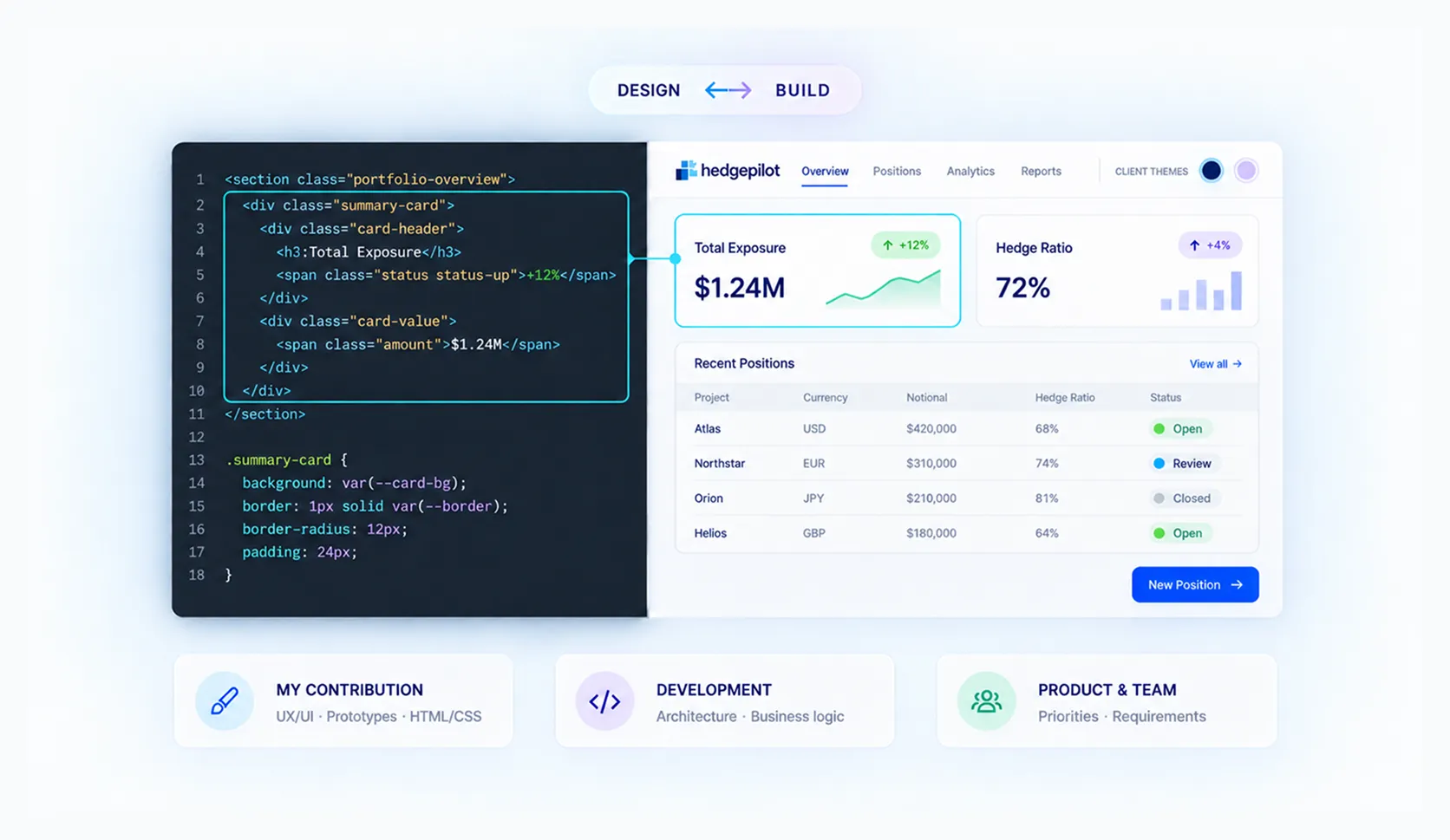
The responsibility was clearly shared:
This way of working carried over to IBOR and other products at the company. On IBOR, I worked on restyling an older application built with Less that had to adapt to different themes for each client.
User story → technical conversation → design in Figma or code → visual layer → integration → shared adjustments
Isolated handoff → continuous collaboration → code as part of the design process
TEAM FEEDBACK
The mix of design, collaboration, and implementation was also recognized by the people I worked with directly in engineering, technical leadership, and management.
Translated from Spanish
Her main responsibility was the design of a web application. Paula prepared an initial proposal, discussed it with the Product Owners or with advanced users, and improved the design based on the feedback she received. In addition, and perhaps this is the most exceptional part, she implemented the HTML and CSS herself. […] Paula has proven to be a great employee: responsible, creative, and a team player. Her ability to focus on the key points and bring a specialized perspective has contributed very positively to completing the tasks assigned to her.
Su principal responsabilidad era el diseño de una aplicación web. Paula preparaba una propuesta inicial, la discutía con los Product Owners o con usuarios avanzados y a partir del feed-back obtenido mejoraba el diseño. Además, y posiblemente esto sea lo más excepcional, ella misma se encargaba de la implementación del HTML y el CSS. […] Paula ha demostrado ser una gran empleada, responsable, creativa y team player. Su habilidad para focalizarse en los puntos clave y aportar una visión especializada han contribuido muy positivamente a la conclusión de las tareas que se le han asignado.
Her primary responsibilities, during her employment include, but are not limited to, designing components for different web applications, preparing mocks and wireframes, implementing HTML and CSS of the designed components as well as discussing and refining proposals with Product Owner and final users. […] Based on experience of all colleagues who are working with her, Paula proves herself as a hardworking, dependable and creative colleague and a team player. Her ability to quickly focus on key issues contributes very positively to the completion of all the tasks given to her, beyond expectations.
Translated from Spanish
She worked at the organization for more than 2 years, always showing broad knowledge and an excellent attitude. The work she did, with commitment and responsibility, was related to her area of expertise: UX/UI design and front-end application development.
Trabajó en dicha organización por más de 2 años, mostrando siempre amplios conocimientos y una actitud excelente en todo momento. Las funciones que desempeñó, de una manera comprometida y responsable, estuvieron relacionadas con su área de conocimiento: Diseño UX/UI y desarrollo de aplicaciones Frontend.
Three complementary perspectives: engineering, Capmatix technical leadership, and management.
Full recommendations available on request.
RESULT
The growth of the role shows in the widening scope of my responsibilities. During my time at LPA, I:
My time at LPA turned an early affinity for code into a core part of how I design: understanding the product through the experience, the business, and the implementation.
LPA (opens in a new tab) · HedgePilot (opens in a new tab) · Capmatix (opens in a new tab)
LEARNINGS
Understanding the technical environment lets you anticipate problems and propose more sustainable solutions.
In specialized products, simplifying means helping people find their way, decide, and act without hiding necessary information.
Besides keeping visual consistency, they give design and development a shared language.
Working close to the team lets you adjust proposals while they can still change.
Reading documentation, testing interactions, and designing directly in frontend gave me more autonomy to evaluate solutions and work with development in a shared language.
Next case study
Pelt8 · Designing beyond the product